Showing posts with label Error. Show all posts

Thursday, April 21, 2016

Could Not Find 'Xamarin.iOS'

Error: Could Not Find 'Xamarin.iOS'

You will get this error while building your xamarin ios/iphone/ipad project in visual studio.
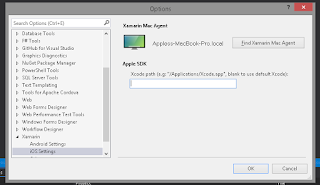
To build ios apps in visual studio you need xamarin installed (at least xamarin.ios) on a mac machine in same network and link to that machine in visual studio.
you can link mac machine (xamarin installed on that) in visual studio from tools menu -> options
Compiled by: Dr. Rajesh Rolen
Read More

Wednesday, December 10, 2014

'System.Linq.IQueryable' does not contain a definition for 'Include' and no extension method 'Include' accepting a first argument of type 'System.Linq.IQueryable' could be found

Error: 'System.Linq.IQueryable' does not contain a definition for 'Include' and no extension method 'Include' accepting a first argument of type 'System.Linq.IQueryable' could be found

Solution: Add namespace System.Data.Entity; 
Actually Include is not an extension method on Queryable, so it doesn't come with all the usual LINQ methods. 
If you are using Entity Framework, you need to import namespace System.Data.Entity:
Read More

Tuesday, December 9, 2014

the type or namespace name 'expression' could not be found

To remove error "the type or namespace name 'expression' could not be found" Add namespace System.Linq.Expressions. as normally System.Linq is there in using part by default and expression class is under system.Linq.Expressions so we have to make it also in using.
Read More

Thursday, November 6, 2014

The cast to value type 'Double' failed because the materialized value is null. Either the result type's generic parameter or the query must use a nullable type


The cast to value type 'Double' failed because the materialized value is null. Either the result type's generic parameter or the query must use a nullable type OR The cast to value type 'Int32' failed because the materialized value is null. Either the result type's generic parameter or the query must use a nullable type Solution: Put conversion on values before putting it in functions like Avg, Sum etc like: In below code we have put conversion to decimal in average function.
var res =(from profile in dbModel.ProfileMasters
                                         select new
                                         {
                                             ProfileID = profile.ProfileId,
                                             Profile = profile.ClientName,
                                             Tasks= profile.TaskMasters.Count(),
                                             AverageTime = profile.TaskMasters.Select(x => EntityFunctions.DiffMinutes(x.StartTime, x.EndTime)).Average(y => (decimal?)y.Value),
                                             LastTime = profile.TaskMasters.Max(x=>x.StartTime)
                                         }).ToList();

Read More

Saturday, January 18, 2014

Debugging Dll


System.Diagnostics.Debugger.Break();
Read More

Error for enumerable when using JsonConvert.SerializeObject


[Serializable]
    public abstract class Entity
    {
        public Entity()
        {
        }

        public Entity(int id)
        {
            this.Id = id;
        }

        public virtual int Id { get; set; }

        public override bool Equals(object obj)
        {
            Entity other = (Entity)obj;
            return this.Id == other.Id;
        }

        public override int GetHashCode()
        {
            return this.Id.GetHashCode();
        }
    }
Read More

Wednesday, August 10, 2011

When caching is enabled for the XmlDataSource that is not in the page's control tree it requires a UniqueID that is unique throughout the application.

XmlDataSource class internally calls a private method called CreateCacheKey. Now, if you are using XmlDataSource without an ID, after upgrading the solution to ASP.NET 3.5, this might throw an exception - "When caching is enabled for the XmlDataSource that is not in the pages control tree it requires a UniqueID that is unique throughout the application." This is due to the absence of the UniqueID (which is read-only, but my experiment shows that setting the ID handles the same), which is used as part of the caching key, without which all instances would try to use same caching key. Setting a distinct ID solves this problem and the problem goes away

eg:


XmlDataSource XmlSrc = new XmlDataSource();
XmlSrc.ID = "someid";


Compiled By: Rajesh Rolen

Read More

Friday, January 7, 2011

what is the name of the iis process in windows 7 or I am not able to find IIS process in windows 7

if you are using visual studio in windows 7 and you wants to attach your asp.net code with worker process "w3wp.exe". follow below steps.

press: ctrl + alt + P
you will not able to find this process directly there so to get that process in list you will have to check the check box "Show processes in all sessions".
now if you not started your visual studio with admin rights then it will ask you to save and restart visual studio with admin rights. click it and it will restart visual studio with admin right and its done.
now again press: ctrl + alt + P and check checkBOx "Show processes in all sessions" and you can now view "w3wp.exe" process. so just select it and attach..


Solution By: Rajesh Rolen
Read More

Thursday, January 6, 2011

HTTP Error 500.23 - Internal Server Error An ASP.NET setting has been detected that does not apply in Integrated managed pipeline mode.

HTTP Error 500.23 - Internal Server Error
An ASP.NET setting has been detected that does not apply in Integrated managed pipeline mode.

You gets this error mostly in windows 7 when you wants to run you web site using virtual directory on IIS.

This solution is :Open IIS manager, and go to the Application Pool for your site.
Change the properties of the application pool from "Integrated" to "Classic".

Solution By: Rajesh Rolen
Read More

Friday, December 10, 2010

The remote server returned an error: (503) Bad sequence of commands.

While working with FTP some times you gets this error "The remote server returned an error: (503) Bad sequence of commands." to resolve it just do set

_request.KeepAlive = false;

actually by default it keeps your ftp request connection open even your work is done.but when we will set its KeepAlive to false so now it will not give you the error again.

Solution By:

Rajesh Rolen

Read More

Friday, September 17, 2010

Crystal Reports .NET Error - "Access to report file denied. Another program may be using it."

Crystal Reports .NET Error - "Access to report file denied. Another program may be using it."

From the been there, done that, beat my head against the wall until I figured it out file:

This is a very misleading error message, and usually has nothing to do with another program. The actual filename will differ based on your configuration, but the entire error message will be the same, similar to what's shown below.

Error in File C:\DOCUME~1\FFUK\ASPNET\LOCALS~1\Temp\temp_9ff883f0-88e3-469c-a942-092ca424001a.rpt: Access to report file denied. Another program may be using it.

In this example (http://www.asp.net/Forums/ShowPost.aspx?tabindex=1&PostID=574159), the code was listed, setting the output file as such:

DiskOpts.DiskFileName = "C:\Output.pdf"

Usually, the ASPNET user does not have write permission granted to it, and especially not on the root directory. The solution in this case was to change the output directory to a subfolder of the web root, and grant ASPNET Modify permissions on that folder. If you're using Windows Server 2003, you need to grant permissions to Network Service, not ASPNET.

If you have configured your application to run as a user other than ASPNET, you need to make sure that user has the permissions described above. On Windows Server 2003, you need to grant permissions to NetworkService user, not ASPNET. The .NET Framework on Win2K3 uses NetworkService, while on Win2K, ASPNET.

provide write permission on c:\windows\temp

Dot forgot to restart IIS after setting permissions on folder:
go to run type iisreset and press enter.
Read More
Powered By Blogger · Designed By Seo Blogger Templates